Google TV Streamer IPTV Canada
4K Setup, Best Apps & Buying Guide
Use this Google TV Streamer IPTV Canada guide to compare features, install compatible IPTV players, optimize 4K playback and decide whether Google’s latest streaming device is right for your home.
What Is Google TV Streamer IPTV Canada?
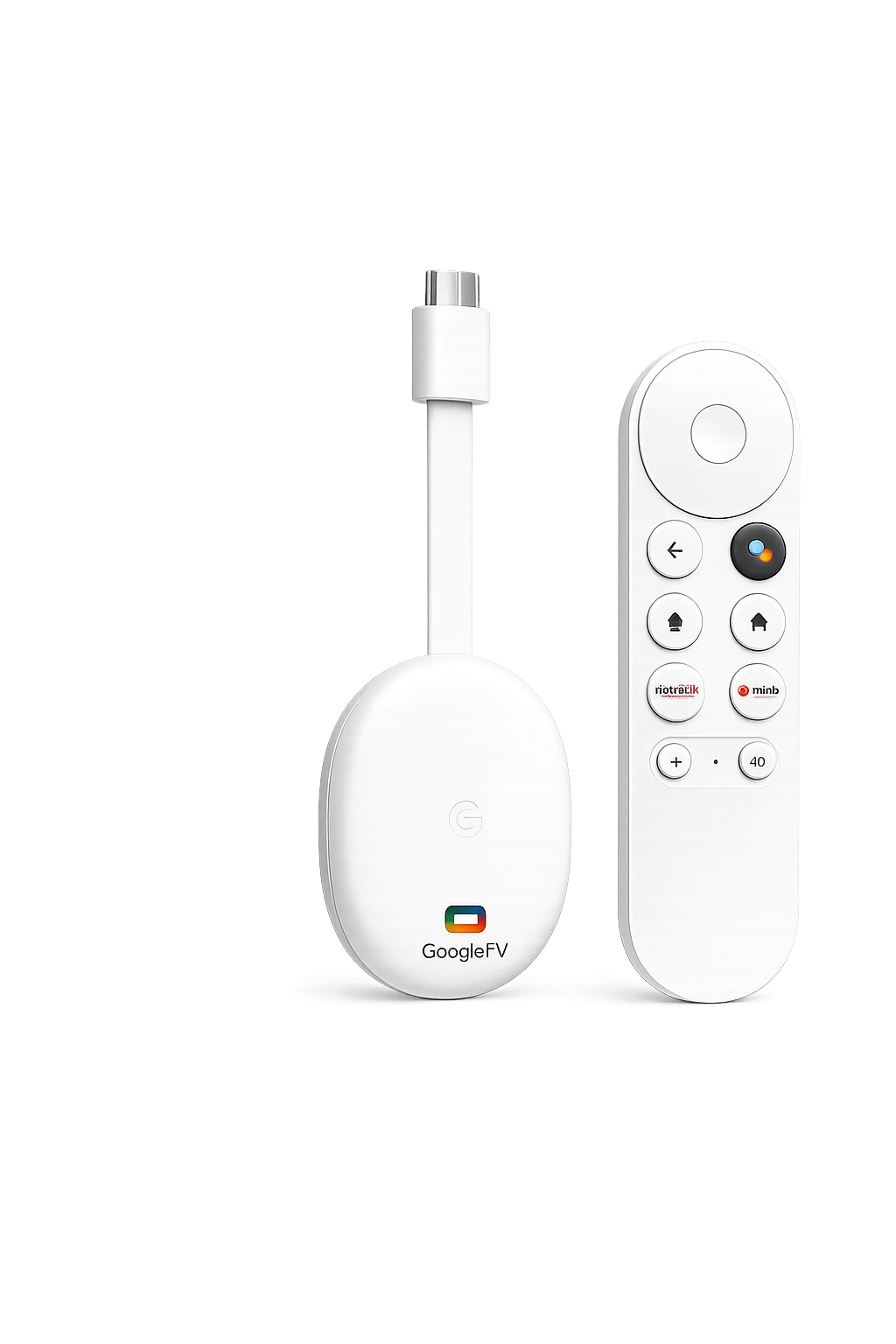
Google TV Streamer IPTV Canada describes using Google’s 4K streaming device with compatible IPTV player apps and lawful streaming services.
Google TV Streamer is Google’s current standalone television streaming device. It replaces the dongle-style Chromecast design with a small tabletop unit, a redesigned voice remote and built-in Ethernet. It runs Android TV OS with the Google TV interface, giving users access to compatible apps through Google Play.
The device does not include IPTV channels by itself. You need a compatible player and a separate authorized subscription. Its main advantages are the polished Google TV interface, 32GB of storage, 4GB of memory, strong app support and wired network connectivity.
Clean Google TV interface
Profiles, recommendations, search and installed apps are organized in a familiar television-first layout.
Built-in Gigabit Ethernet
The integrated RJ45 port makes wired streaming easier without purchasing a separate adapter.
Broad app availability
Compatible streaming and IPTV player apps can be installed from Google Play depending on region and availability.
Smart-home control
Matter support, a Thread border router and the Google Home panel extend the device beyond entertainment.
Google TV Streamer IPTV Canada Specifications
The official hardware is designed for 4K streaming, app storage and a more responsive Google TV experience.
| Specification | Google TV Streamer (4K) | Why it matters |
|---|---|---|
| Resolution | Up to 4K HDR at 60 FPS | Supports high-resolution television and video playback |
| Memory | 4GB RAM | Helps navigation and app switching feel smoother |
| Storage | 32GB | More room for apps than older Chromecast models |
| Ethernet | Built-in RJ45, up to 1Gbps | Useful for stable live television and 4K streams |
| Wireless | Wi-Fi 802.11ac, dual band; Bluetooth 5.1 | Supports wireless networking and accessories |
| Video formats | Dolby Vision, HDR10, HDR10+ and HLG | Broad HDR compatibility on supported televisions |
| Audio | Dolby Digital, Dolby Digital Plus and Dolby Atmos | Supports compatible home-theatre equipment |
| Ports | USB-C, HDMI 2.1 and Ethernet | HDMI cable is required and may be sold separately |
| Smart home | Matter hub and Thread border router | Connects compatible smart-home devices |
Does Google TV Streamer Work With IPTV?
Yes. Google TV Streamer can run compatible Android TV IPTV player applications available for the device.
After installing a player, users can add service credentials in the format supported by their provider, such as an account login or playlist URL. Google TV Streamer acts as the playback device; the content, account rules and available channels come from the separate service.
For the smoothest Google TV Streamer IPTV Canada setup, confirm app availability before purchasing, use Ethernet when practical and test the service on your own connection before committing to a longer subscription.
Best IPTV Apps for Google TV Streamer Canada
The right application depends on interface preference, playlist format, guide support and whether premium features are required.
TiviMate
A television-focused Android TV player known for its polished guide, favourites, categories and multi-playlist features.
IPTV Smarters
A familiar option for users who prefer a simple login flow and separate live TV, movie and series sections.
XCIPTV
A remote-friendly player with live TV, EPG and VOD support for compatible services.
Sparkle TV
A modern Android TV player that focuses on a native television experience and guide-based navigation.
IBO Player
Availability and activation model can vary, so verify the supported Google TV version before paying.
VLC
A general media player useful for testing compatible network streams and local video files.
See our complete best IPTV apps Canada guide and TiviMate setup guide for more detail.
How to Set Up Google TV Streamer IPTV Canada
Google provides setup through the Google Home app or directly with the voice remote.
Connect HDMI and power
Connect the Google TV Streamer to an available HDMI port, attach USB-C power and switch the television to the correct input.
Connect Ethernet or Wi-Fi
Use the built-in Ethernet port for maximum stability, or connect to your home Wi-Fi network during setup.
Pair the voice remote
The remote normally pairs automatically. When prompted, follow the on-screen pairing instructions.
Complete Google TV setup
Use the Google Home app to scan the QR code, or complete setup directly on the television with your Google Account.
Install an IPTV player
Open Google Play, search for your preferred compatible player and install the official application.
Add account details
Enter the server URL, username, password or playlist information supplied by your authorized service.
Configure the guide and favourites
Refresh the playlist, load the EPG, organize favourite channels and choose the preferred playback settings.
Test before long-term use
Check live television, VOD, audio synchronization and picture quality at different times of day.
Google TV Streamer IPTV Canada vs Other Devices
Google’s device is strongest for a polished ecosystem and built-in Ethernet, but other boxes may suit different priorities.
| Device | Main strength | Best for |
|---|---|---|
| Google TV Streamer Balanced choice | Google TV interface, 32GB storage and built-in Ethernet | Mainstream apps, smart-home integration and daily use |
| NVIDIA Shield TV | Premium Android TV performance and advanced upscaling | Power users, home theatre and gaming |
| Formuler | MYTVOnline television-first experience | Dedicated IPTV viewing and remote navigation |
| BuzzTV | Wide hardware selection, PVR and TimeShift | Advanced IPTV users and recording |
| Fire TV Stick 4K | Compact design and lower entry price | Budget-friendly streaming |
| Chromecast with Google TV | Small dongle form | Existing owners who do not need more storage or Ethernet |
Internet Speed for Google TV Streamer IPTV Canada
Consistent bandwidth, low packet loss and a stable local network matter more than the highest advertised speed.
HD playback
A stable 15–25 Mbps per active stream is a practical target for most HD content.
4K playback
Allow roughly 35–50 Mbps per active device for higher-bitrate 4K content and useful headroom.
Wired connection
The built-in Gigabit Ethernet port is ideal when Wi-Fi is congested or the router is far from the television.
For extra help, read our IPTV buffering guide for Canada.
Google TV Streamer IPTV Canada Buying Checklist
Review these points before buying the device or choosing an IPTV service.
- HDMI cable: confirm whether your retailer bundle includes one.
- App availability: search Google Play for the exact IPTV player you intend to use.
- Ethernet location: check that a network cable can reach the television area.
- Television support: verify 4K, HDR and Dolby formats on your display.
- Audio equipment: confirm Dolby Atmos compatibility when it matters.
- Storage needs: 32GB is useful for apps, but not designed as large local movie storage.
- Service rules: confirm simultaneous-stream and device limits before purchasing.
- Trial testing: test the service on your own internet connection before a long plan.
Google TV Streamer IPTV Canada Troubleshooting
Most problems are caused by connectivity, outdated software, full app caches or incorrect subscription details.
Buffering or freezing
- Restart the streamer and router
- Test the Ethernet connection
- Close background applications
- Try a lower stream quality
App feels slow
- Install app and system updates
- Clear the app cache or data
- Restart Google TV
- Remove unused applications
Account will not load
- Check the server URL carefully
- Re-enter username and password
- Confirm the service is active
- Verify the selected login method
Remote problem
- Replace the batteries
- Restart the device
- Re-pair the remote
- Use Find My Remote when available
Official Google TV Streamer Resources
Use these manufacturer pages to confirm current specifications, setup steps and product support.
Google TV Streamer IPTV Canada FAQ
Answers to common questions from Canadian users.
Can Google TV Streamer run IPTV apps?
Yes. It can install compatible Android TV IPTV player applications available through Google Play. A separate authorized subscription is required.
Does Google TV Streamer include Ethernet?
Yes. Google lists a built-in RJ45 Ethernet port supporting up to 1Gbps.
How much storage does Google TV Streamer have?
The device has 32GB of storage and 4GB of memory.
Is Google TV Streamer better than Chromecast with Google TV?
It provides more memory, more storage, a faster processor, built-in Ethernet, a redesigned remote and smart-home features. Existing Chromecast owners may still be satisfied if those upgrades are unnecessary.
Does Google TV Streamer support 4K?
Yes. It supports up to 4K HDR at 60 FPS with compatible displays and content.
Which IPTV app is best for Google TV Streamer?
TiviMate, IPTV Smarters, XCIPTV and Sparkle TV are common options. The best player depends on app availability, guide features and your service format.
Is Google TV Streamer legal in Canada?
Owning and using the device is legal. Users are responsible for accessing content through properly licensed services and following applicable laws and service terms.
Try IPTV on Google TV Streamer
Check trial availability and test channel loading, guide performance, picture quality and compatibility on your own internet connection before choosing a longer plan.