Formuler IPTV Canada: Best Boxes, Setup & Buying Guide
Compare the latest Formuler boxes, understand MYTVOnline3, and choose the right setup for smooth 4K streaming in Canada.
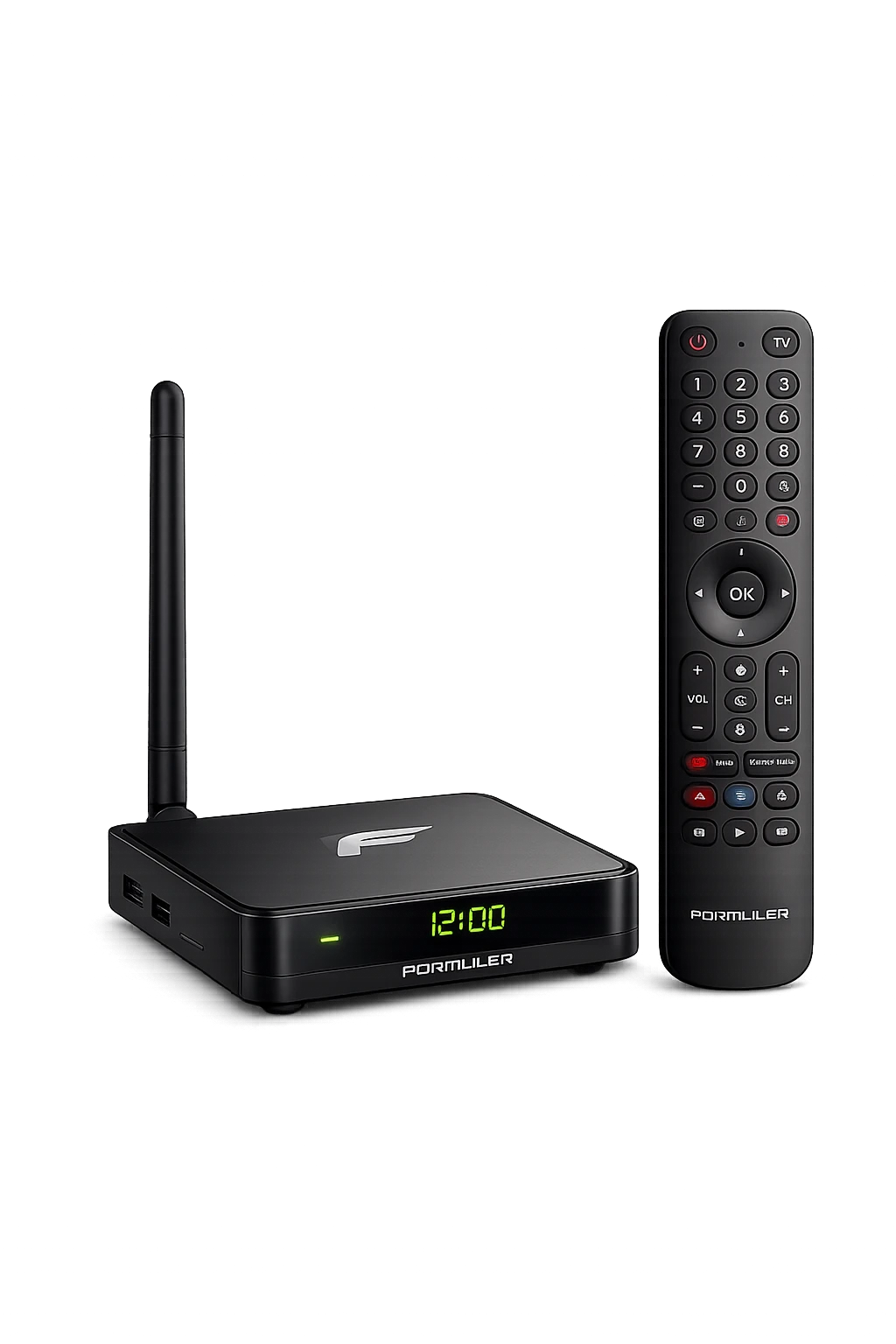
Formuler IPTV boxes are designed for viewers who want a television-first streaming experience. Instead of relying on a basic mobile-style player, compatible Formuler devices use the MYTVOnline platform, a remote-friendly interface built around live channels, programme guides, favourites, catch-up and recordings.
For Canadian households, a Formuler box can be a strong alternative to using an IPTV app directly on a smart TV. It offers dedicated hardware, Ethernet on many models, a purpose-built remote and an interface that is easy to navigate from the sofa.
Is Formuler Worth It for IPTV in Canada?
Best for
- Live TV and sports viewers
- People who prefer a cable-like interface
- 4K televisions and Ethernet setups
- Users who want recording and timeshift tools
Consider another device if
- You only use mainstream on-demand apps
- You need the lowest possible price
- You require a certified Google TV interface
- You already own a fast Fire TV or Shield
Verdict: Formuler is one of the strongest choices for users who value polished live-TV navigation, fast channel switching and a traditional remote-control experience. Premium models cost more than entry-level Android boxes, but MYTVOnline integration makes them easier to use as a primary living-room device.
What Is a Formuler IPTV Box?
Formuler produces Android-based media receivers for IPTV and OTT streaming. The current range includes the premium Formuler Z12 Ultra, the established Z11 Pro Max, lower-cost Z-series models and compact devices such as the Z mini.
The main difference between Formuler and a generic Android box is the software experience. Formuler devices integrate with MYTVOnline, the company’s media-viewing client. The interface is designed around channel groups, EPG data, favourites, catch-up, recordings and remote navigation.
Compatible services can commonly be connected through a portal, login-based API or M3U playlist. Availability depends on the device, software version and authorized service used.
Why Canadian Viewers Choose Formuler
Modern video support
Current premium models support 4K output and modern codecs. A stable internet connection and optimized source are still required for consistent 4K playback.
TV-style programme guide
MYTVOnline organizes channels and programme data in a familiar grid, reducing the learning curve for viewers moving from cable.
Stable networking
Premium models include Gigabit Ethernet. A wired connection can reduce interference and is ideal when the router is near the television.
Recording and timeshift
MYTVOnline supports recording and timeshift workflows on compatible devices and services. Storage and stream limits vary.
Best Formuler IPTV Boxes in 2026
The best model depends on your television, home network, storage needs and budget.
| Model | Best for | Memory / storage | Network | Software |
|---|---|---|---|---|
| Z12 Ultra Best overall | Premium 4K setup and large local storage | 4GB DDR4 / 128GB | Wi-Fi 6E, Bluetooth 5.2, Gigabit Ethernet | Android 12, MYTVOnline3 |
| Z11 Pro Max Best value premium | Fast everyday IPTV use and 4K playback | 4GB DDR4 / 32GB | Wi-Fi 6 class, Bluetooth, Gigabit Ethernet | Android 11, MYTVOnline3 |
| Z11 Pro | MYTVOnline3 at a lower hardware tier | Lower than Pro Max | Wireless plus Ethernet | Android 11, MYTVOnline3 |
| Z10 Pro Max | Older but capable 4K setups | 4GB DDR4 / 32GB | Dual-band Wi-Fi, Gigabit Ethernet | Android 10, MYTVOnline2 |
| Z mini | Compact, light 4K streaming | 2GB / 8GB | Dual-band wireless | Android 12, MYTVOnline3 |
Formuler Z12 Ultra
The best overall choice for a new premium setup. Official specifications list 4GB DDR4 memory, 128GB storage, Android 12, Wi-Fi 6E, Bluetooth 5.2 and Gigabit Ethernet. It supports AV1, Dolby Vision and Dolby Atmos.
Formuler Z11 Pro Max
A strong value when priced below the Z12 Ultra. It combines 4GB RAM, 32GB storage, 4K decoding, Gigabit Ethernet and MYTVOnline3 in a mature platform.
Formuler Z11 Pro
A lower-tier way to get the MYTVOnline3 experience. It suits users who prioritize live-TV navigation over extra memory and storage.
Formuler Z mini
A compact model for a simple hidden installation. Its 2GB memory and 8GB storage are better for light use than heavy multitasking or extensive recordings.
What Is MYTVOnline3?
MYTVOnline3 is Formuler’s integrated media client for supported devices. It combines live channels, video-on-demand categories, TV series, programme information and playback controls in one interface.
- Electronic programme guide support
- Favourites, pinned groups and hidden categories
- Universal search and watchlists
- Catch-up or replay when supported
- Recording and timeshift on compatible setups
- Multiple portal or playlist management
- Parental controls and channel locking
- Sports-oriented Game Day features on supported versions
The channel list, EPG quality and stream reliability come from the connected service—not from the Formuler box itself.
How to Set Up IPTV on a Formuler Box
Connect the device
Connect the box to your television with HDMI, attach power and select the correct TV input.
Connect to the internet
Use Gigabit Ethernet where practical. Otherwise, connect to a strong 5GHz or 6GHz Wi-Fi network supported by your model.
Install updates
Run all available Formuler firmware and MYTVOnline updates before adding a service.
Open MYTVOnline
Launch MYTVOnline3 or MYTVOnline2 and select the connection method supplied by your authorized provider.
Add the service
Enter the portal URL, login credentials or playlist details exactly as provided. Avoid accidental spaces.
Load channels and EPG
Allow the first synchronization to finish. Large libraries and programme data may take several minutes.
Optimize playback
Set resolution, refresh-rate behaviour, audio output and buffer options for your TV and network.
For common terminology, read our IPTV Smarters Pro guide and TiviMate guide.
Recommended Internet Speed
| Quality | Practical target | Recommended connection |
|---|---|---|
| SD | 10 Mbps+ | Strong Wi-Fi |
| HD / Full HD | 25 Mbps+ | 5GHz Wi-Fi or Ethernet |
| 4K | 50 Mbps+ | Gigabit Ethernet or excellent Wi-Fi 6/6E |
| Multiple streams | Add capacity per active stream | Modern router and Ethernet where possible |
These are practical targets, not fixed technical requirements. Bitrate, compression, household use and source performance all matter. For freezes and stuttering, follow our IPTV buffering guide.
Formuler vs NVIDIA Shield and Firestick
Choose Formuler for
- Integrated MYTVOnline experience
- Traditional channels and EPG navigation
- Remote-first IPTV use
- Recording-focused workflows
Choose NVIDIA Shield for
- Powerful Android TV ecosystem
- Gaming and media-server features
- Broad app flexibility
- More general-purpose streaming
For IPTV as the primary television source, Formuler is usually easier. For gaming, Plex and broader app use, the Shield is more versatile. Read the full NVIDIA Shield IPTV guide.
A Firestick is cheaper and more portable, while Formuler offers a richer television-style interface, more storage options and better wired-network support. Compare setup methods in our Firestick IPTV Canada guide.
What to Check Before Buying in Canada
- Exact model: Z12 Ultra, Z11 Pro Max, Z11 Pro, Z mini or an older generation.
- Power adapter: Confirm Canadian plug compatibility.
- Remote: Retail bundles may include different remotes.
- Warranty: Confirm who handles returns and service.
- Seller: Buy from a reputable retailer and keep the invoice.
- Ethernet: Confirm whether the selected model includes Gigabit LAN.
- Storage: Choose more if you install many apps or save recordings.
- Software: Newer models use MYTVOnline3; older devices may use MYTVOnline2.
Compare other receivers in our best IPTV box Canada guide.
Common Formuler IPTV Problems
Portal will not connect
Recheck the URL and credentials, remove spaces, restart the router and confirm the service is active.
Channels are buffering
Test Ethernet, stop heavy downloads, update the device and compare several channels.
EPG is empty
Refresh the portal, verify timezone and EPG offset, then allow programme data to load.
No sound
Change the audio track, test PCM output and confirm your TV or receiver supports the selected format.
See our complete IPTV not working guide for more fixes.
Frequently Asked Questions
Does a Formuler box come with IPTV channels?
No. It is a media receiver and player. You must connect it to a compatible source you are legally authorized to use.
What is the best Formuler box in 2026?
The Z12 Ultra is the strongest overall model for buyers who want 128GB storage, Wi-Fi 6E, Gigabit Ethernet and premium 4K format support.
Is the Z11 Pro Max still worth buying?
Yes. Its 4GB RAM, 32GB storage, Gigabit Ethernet and MYTVOnline3 remain capable. Compare its price with the Z12 Ultra.
Can I install TiviMate on Formuler?
Many Android-based models can install compatible third-party apps, although MYTVOnline is the main reason to choose Formuler.
Does MYTVOnline require a subscription?
MYTVOnline is included on compatible hardware, but it is only a player. Connected services may have separate terms and fees.
Can Formuler record live TV?
MYTVOnline supports recording on compatible models and services. Storage, stream limits and source restrictions may apply.
Is Ethernet better than Wi-Fi?
Ethernet is usually more consistent because it avoids wireless interference. Strong Wi-Fi 6 or 6E can also work well.
Can Formuler work with any television?
Most modern TVs with HDMI can display a Formuler box. For 4K, the TV, HDMI input, cable and content must support 4K.
Why is my Formuler EPG not loading?
Refresh the portal, check timezone and EPG offset, and confirm that the connected source provides programme data.
Can I use a VPN on Formuler?
Compatible Android VPN apps may be available. A VPN can reduce speed, so use a nearby server and follow applicable laws and service terms.
Final Verdict: Formuler Is a Strong Premium IPTV Box
Formuler stands out because the hardware and MYTVOnline software work together as a television-first system. The Z12 Ultra is the most complete current option, while the Z11 Pro Max remains an excellent value when priced competitively.