Get Instant Access
NVIDIA Shield IPTV Canada 2026

NVIDIA Shield IPTV Guide: Setup, Apps & 4K Performance

Learn how to use IPTV on NVIDIA Shield TV in Canada, choose the right player app, optimize picture quality, reduce buffering, connect Ethernet, and build a premium Android TV streaming setup.

Android TV Platform4K HDR PlaybackGigabit EthernetPopular IPTV Apps
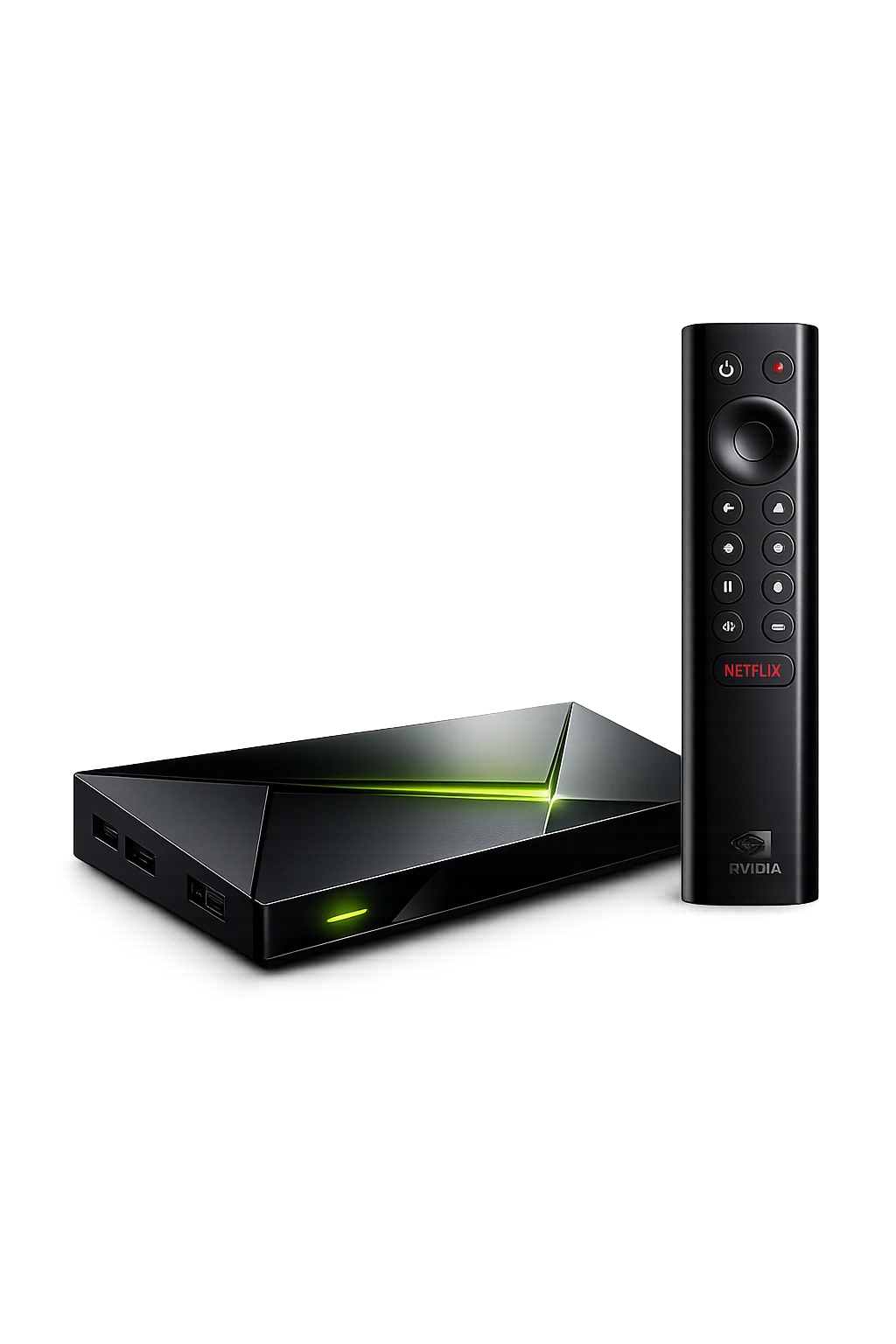
NVIDIA Shield IPTV setup in Canada with Shield TV and remote
Quick Answer

Is NVIDIA Shield Good for IPTV?

Yes. NVIDIA Shield TV is one of the strongest Android TV devices for IPTV because it combines fast navigation, Ethernet connectivity, broad app support, 4K HDR playback, and AI-enhanced upscaling on supported content. The Shield TV Pro includes the Tegra X1+ processor, 3 GB of RAM, two USB 3.0 ports, Dolby Vision HDR, HDR10, and AI-enhanced upscaling up to 4K 60 FPS.

For the best result, install a trusted IPTV player from Google Play, use Ethernet when possible, keep the Shield and player app updated, and test your connection before choosing a long subscription. Compare compatible options in our Best IPTV Apps Canada guide.

Why Shield TV

Why NVIDIA Shield Works Well for IPTV

Shield TV is designed as a premium streaming platform. Its combination of hardware, Android TV software, networking, and video support makes it suitable for users who want a responsive home-theatre setup.

1

Fast App Navigation

The Tegra X1+ platform provides responsive menus, quick category browsing, and smoother switching between compatible streaming apps.

2

Ethernet Stability

Built-in Ethernet can reduce Wi-Fi interference and provide a more consistent connection for live channels and 4K streams.

3

4K HDR Support

Shield TV supports 4K HDR playback, Dolby Vision HDR, and HDR10 on compatible televisions and content.

4

AI Upscaling

Supported lower-resolution video can be sharpened toward the television's native resolution using NVIDIA's AI-enhanced upscaling.

5

Google Play Apps

Android TV provides access to compatible IPTV players and streaming applications through Google Play.

6

Home-Theatre Features

Dolby Atmos support, HDMI connectivity, and broad media-format support make Shield attractive for advanced setups.

Device Comparison

NVIDIA Shield TV vs Shield TV Pro for IPTV

Both models support Android TV and 4K streaming, but Shield TV Pro is the stronger option for users who want more memory, extra storage flexibility, USB accessories, and advanced home-theatre use.

FeatureShield TVShield TV ProWhy It Matters for IPTV
ProcessorTegra X1+Tegra X1+Supports responsive Android TV navigation and hardware video decoding.
Memory2 GB RAM3 GB RAMMore memory can help heavier multitasking and advanced apps.
AI UpscalingUp to 4K 30 FPSUp to 4K 60 FPSCan improve supported HD video on a compatible 4K television.
EthernetBuilt inBuilt inUseful for stable live TV and sports streaming.
USB PortsNo full-size USB portsTwo USB 3.0 portsUseful for storage, accessories, tuners, keyboards, or media drives.
Best ForCompact premium streamingAdvanced IPTV and home theatreChoose based on storage, accessories, and multitasking needs.
Hardware and software details can change by region or revision. Confirm the current model specifications on NVIDIA's official Shield pages before purchasing.
Best Player Apps

Best IPTV Apps for NVIDIA Shield

The best app depends on the login format, interface you prefer, EPG features, and whether you need favourites, catch-up support, multiple playlists, or advanced playback settings.

TiviMate

A popular Android TV player with a television-style interface, favourites, categories, EPG controls, and remote-friendly navigation.

IPTV Smarters

A flexible choice for live TV, movies, series, and common account formats. Interface and features vary by version.

XCIPTV

An Android-focused player with live TV, VOD, EPG, and a simple remote-based layout.

Sparkle TV

A modern Android TV player suited to users who want a clean guide, favourites, and television-style browsing.

Kodi

An advanced media platform that can support legal playlist and add-on configurations, but setup is more technical.

VLC

Useful for basic playlist and stream testing, although it does not provide the same full TV guide experience as dedicated players.

Step-by-Step Setup

How to Install IPTV on NVIDIA Shield TV

Use a licensed IPTV player and service you are authorized to access. The general process below works for most Android TV player apps.

1

Connect the Shield

Connect HDMI, power, and preferably Ethernet. Complete the Android TV setup and sign in to your Google account.

2

Open Google Play

Search for your preferred IPTV player. Install apps from trusted sources and keep Google Play Protect enabled.

3

Enter Login Details

Open the player and enter the account information supplied by your authorized service provider.

4

Load Channels

Allow the app to load live TV, movies, series, and guide data before judging performance.

5

Set the EPG

Confirm the guide time zone, update interval, and category order so channel information appears correctly.

6

Create Favourites

Save the channels and categories you use most to reduce browsing time and simplify daily viewing.

7

Test Playback

Test several channels, sports, and VOD titles during normal viewing hours.

8

Optimize Settings

Adjust display mode, audio output, app decoder, buffer size, and network connection only when needed.

Performance Settings

Best NVIDIA Shield Settings for IPTV

Use Ethernet for the most stable connection when the router is nearby.
Match the Shield display mode to your television's supported resolution and refresh rate.
Enable Dolby Vision only when the television, HDMI input, and cable support it.
Test AI-enhanced upscaling at Low, Medium, or High and choose the most natural result.
Keep Shield Experience and player apps updated.
Close unused heavy apps when diagnosing playback problems.
Picture Quality

4K, HDR and AI Upscaling

Shield TV supports 4K HDR playback and can output Dolby Vision or HDR10 when the television and content are compatible. NVIDIA's AI-enhanced upscaling can sharpen supported lower-resolution video toward the TV's native resolution.

Upscaling does not turn a poor source into true native 4K. Stream quality, bitrate, compression, television processing, and the player app still affect the final result.

For live sports, prioritize stable frame delivery and natural motion over aggressive sharpening.

Internet Requirements

Recommended Internet Speed for NVIDIA Shield IPTV

Available speed at the Shield matters more than the internet package's advertised maximum. Test the connection while other household devices are being used.

QualityPractical Speed TargetRecommended ConnectionTesting Tip
SD5 Mbps or moreWi-Fi or EthernetCheck basic stability and channel switching.
HD10 Mbps or moreStrong Wi-Fi or EthernetWatch continuously for several minutes.
Full HD20 Mbps or moreEthernet preferredTest fast-motion sports and busy evening hours.
4K35–50 Mbps or moreEthernet strongly preferredVerify the source is actually 4K and the TV input supports it.
Troubleshooting

How to Fix IPTV Buffering on NVIDIA Shield

Buffering can come from the home network, internet provider, VPN, player app, device settings, or the stream source. Change one factor at a time so you can identify the real cause.

1

Test Ethernet

Connect the Shield directly to the router. If playback improves, Wi-Fi interference or signal strength was likely involved.

2

Restart Equipment

Restart the Shield, modem, and router to clear temporary network or memory issues.

3

Check App Updates

Update the player through Google Play and review its playback or decoder settings.

4

Test Without VPN

A distant or overloaded VPN server may reduce speed. Compare playback with the VPN disabled when appropriate.

5

Clear App Cache

Use Android TV app settings to clear temporary cache when the player becomes slow or unstable.

6

Compare Channels

If only one stream fails while others work, the problem may be specific to that source rather than the Shield.

For a deeper diagnosis, read our IPTV Buffering Fix Canada guide.
Buying Decision

NVIDIA Shield IPTV Pros and Cons

Advantages

  • Responsive Android TV interface and broad app compatibility.
  • Built-in Ethernet for stable live streaming.
  • Strong 4K HDR and home-theatre features.
  • AI-enhanced upscaling on supported video.
  • Shield TV Pro adds USB expansion and more memory.
  • Suitable for users who want one premium device for several media tasks.

Limitations

  • More expensive than many Fire TV or entry-level Android TV devices.
  • Some features are unnecessary for users who only watch basic HD streams.
  • Player configuration can feel technical for beginners.
  • AI upscaling quality depends on the source and user preference.
  • Application availability and features can change over time.
  • A premium device cannot fix a weak internet connection or poor stream source.
Comparison

NVIDIA Shield vs Firestick vs Google TV Streamer

Shield is the premium performance choice, Firestick is compact and budget-friendly, while Google TV Streamer focuses on a simple Google-centered experience.

DeviceBest ForEthernetExpansionOverall IPTV Position
NVIDIA Shield TV ProPremium performance and home theatreBuilt inTwo USB 3.0 portsBest for demanding users and advanced setups.
Amazon Fire TV StickAffordable, compact streamingAdapter may be requiredLimitedGood value for simple IPTV use.
Google TV StreamerEasy Google TV experienceConfirm by modelLimitedGood for families and general daily streaming.
Final Verdict

Is NVIDIA Shield Worth It for IPTV in Canada?

NVIDIA Shield TV is worth considering when you want a premium Android TV device with Ethernet, responsive navigation, strong video support, and room for a more advanced home-theatre setup. Shield TV Pro is especially useful when USB expansion, extra memory, and broader media-server features matter.

Users who only need basic HD playback may save money with a Firestick or another certified Android TV device. Before choosing hardware or a long subscription, compare the Best IPTV Box Canada guide, test compatibility through the Free IPTV Trial Canada page, and review the available Premium IPTV Plans.

FAQ

NVIDIA Shield IPTV FAQ

Can you use IPTV on NVIDIA Shield TV?

Yes. NVIDIA Shield uses Android TV and supports compatible IPTV player apps available through Google Play.

What is the best IPTV app for NVIDIA Shield?

TiviMate, IPTV Smarters, XCIPTV, Sparkle TV, Kodi, and VLC are common options. The best choice depends on your account format and preferred features.

Is NVIDIA Shield TV Pro better for IPTV?

Shield TV Pro adds 3 GB of RAM, two USB 3.0 ports, and AI-enhanced upscaling up to 4K 60 FPS, making it attractive for advanced setups.

Does NVIDIA Shield support 4K IPTV?

Shield supports 4K playback. Actual IPTV quality depends on the source, player, television, HDMI setup, and available internet speed.

Does NVIDIA Shield have Ethernet?

Yes. Shield TV models include built-in Ethernet, which can provide a more stable connection than Wi-Fi.

How much internet speed do I need for IPTV on Shield?

As practical targets, allow around 10 Mbps for HD, 20 Mbps for Full HD, and 35 to 50 Mbps or more for 4K at the device.

Why is IPTV buffering on NVIDIA Shield?

Possible causes include weak Wi-Fi, network congestion, VPN speed, player settings, app cache, internet instability, or an issue with the individual stream.

Should I use Wi-Fi or Ethernet?

Ethernet is generally preferred for stable live sports and 4K playback. Strong Wi-Fi can still work well in suitable conditions.

Can AI upscaling improve IPTV quality?

It can sharpen supported lower-resolution video, but it does not create true native 4K or repair heavily compressed sources.

How do I install an IPTV app on Shield?

Open Google Play on Android TV, search for the player, install it, then enter the authorized account details supplied by your provider.

Can I add storage to Shield TV Pro?

Shield TV Pro has two USB 3.0 ports that can support compatible storage and accessories.

Does Shield support Dolby Vision?

Current Shield TV models support Dolby Vision HDR on compatible televisions, content, display modes, and HDMI connections.

Is NVIDIA Shield better than Firestick for IPTV?

Shield offers stronger hardware, built-in Ethernet, and more advanced features, while Firestick is generally more affordable and compact.

Can I test IPTVEZEN on NVIDIA Shield before buying?

Qualified users can check limited trial availability through the dedicated Free IPTV Trial Canada page.

Is NVIDIA Shield legal to use for IPTV?

The device and IPTV player apps are legal technologies. Users should only access content and services they are authorized to use.

Official Resources

Verify NVIDIA Shield and Android TV Information

Review current specifications on the official NVIDIA Shield TV Pro page, learn about NVIDIA AI upscaling, and follow Google's Android TV app guidance.

Ready to Test IPTV on NVIDIA Shield?

Check trial availability, install a compatible player, test your network and picture quality, then choose the plan that fits your viewing setup.

💬 Free Trial 📺 Plans
💬 Need Help? Chat on WhatsApp